Protecting Your Data
Five practical cybersecurity habits that protect your personal data from modern threats, from passkeys and password managers to spotting AI-powered phishing.


Your personal data is currency. Every login, every transaction, every message you send passes through systems that opportunistic attackers are probing around the clock. The good news? You don't need a background in computer science to mount a serious defence. A handful of deliberate habits, applied consistently, will put you ahead of the vast majority of threats.
This guide covers the five practices that deliver the biggest security payoff for the least effort: building strong credentials, layering your authentication, recognising modern phishing tactics, keeping your software current, and protecting your connection on the move. Each section stands on its own, so feel free to jump to whichever area needs the most attention.
Build Credentials That Actually Hold Up
Passwords remain the primary gatekeeper for most online accounts, yet weak and reused credentials are still the single most exploited vulnerability in personal cybersecurity. Updated NIST guidelines now prioritise length over complexity, recommending a minimum of 15 characters, while CISA pushes that figure to 16. The reasoning is straightforward: a longer passphrase like maple-cabinet-rover-sunset is both harder to crack and easier to remember than a short, symbol-stuffed string you'll inevitably write on a sticky note.
A password manager makes this practical at scale. Tools such as Bitwarden (open-source, free tier available) or 1Password generate, store, and autofill unique credentials for every site you use. You memorise one strong master passphrase; the manager handles the rest. Think of it as a secure vault where every door has a different key, and you only need to carry one.
The Rise of Passkeys
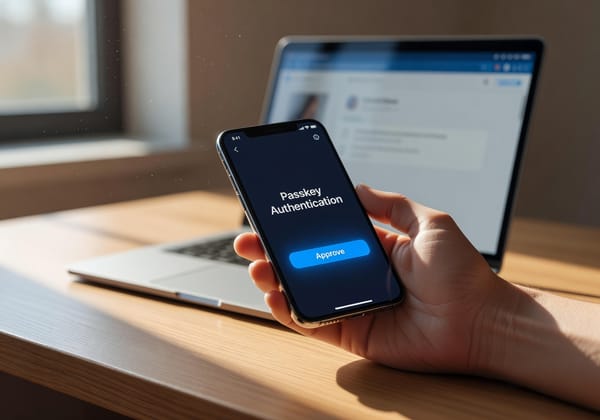
Passwords aren't the only option any more. Passkeys, built on the FIDO2 standard, use public-key cryptography tied to your device or biometric, so there's nothing to type and nothing for an attacker to steal. As of early 2026, 87 per cent of companies in the US and UK have adopted passkeys, and 69 per cent of consumers hold at least one. Apple, Google, and Microsoft all support them natively.
Passkeys are phishing-resistant by design: the credential is cryptographically bound to the legitimate site's origin, meaning a convincing lookalike domain simply won't work. If a service you use offers passkey sign-in, it's worth switching. For everything else, a strong passphrase managed by a password manager remains your best bet.
Layer Your Authentication With 2FA
Even a solid password can be compromised through a data breach or a moment of inattention. Two-factor authentication (2FA) adds a second barrier: something you have or something you are, on top of something you know. If an attacker gets your password, they still can't log in without that second factor.
Not all 2FA methods are created equal. SMS codes are better than nothing, but they're vulnerable to SIM-swapping attacks where a criminal convinces your carrier to port your number. Authenticator apps like Ente Auth or Aegis (Android) generate time-based codes locally on your device, removing the phone carrier from the equation entirely. For the highest security, a hardware key such as a YubiKey provides physical proof of identity that's nearly impossible to intercept remotely.
Prioritise enabling 2FA on your email account first. Your email is the master key to almost every other account because it's the address password-reset links go to. After that, cover banking, cloud storage, and social media. Most platforms now offer 2FA setup in their security settings, and the process rarely takes more than five minutes.
Recognise Phishing in the Age of AI
Phishing has evolved well beyond the clumsy, typo-riddled emails of a decade ago. According to the Anti-Phishing Working Group, attacks exceeded 4.8 million in 2024, and the trend line is still climbing. The biggest catalyst is artificial intelligence: research shows that over 80 per cent of phishing emails now show signs of AI involvement, and Oxford University research found that AI-generated phishing messages achieve a 60 per cent higher click rate than human-crafted ones.
What does this mean in practice? Phishing messages now read like polished corporate communication. Grammar and tone are nearly flawless. Attackers personalise messages with details scraped from social media or previous breaches, and they don't limit themselves to email. QR code phishing ("quishing") surged 400 per cent between 2023 and 2025, embedding malicious links in codes attached to parking metres, restaurant menus, and even fake delivery notices. Voice-cloning technology can replicate a person's voice from as little as three seconds of public audio, enabling convincing phone-based social engineering.
How to Spot It
Technology has raised the bar, but the underlying mechanics of phishing haven't changed. Attackers still need you to take an action: click a link, scan a code, download a file, or hand over credentials. Apply these checks every time:
- Inspect the sender. Look at the full email address, not just the display name. A domain like
paypa1-support.comis not PayPal. - Question urgency. Messages that demand immediate action ("Your account will be suspended in 24 hours") are designed to short-circuit your judgement. Legitimate organisations give you time.
- Hover before you click. On a desktop, hovering over a link reveals the true destination URL. On mobile, press and hold. If the domain doesn't match the supposed sender, don't tap it.
- Verify through a separate channel. If a message claims to be from your bank, open your banking app or navigate to the site directly rather than following the provided link.
A few seconds of scepticism costs you nothing. Falling for a phishing attack can cost you everything from login credentials to financial accounts.
Keep Your Software and Devices Updated
Every piece of software ships with vulnerabilities. Developers find and patch them, but those patches only protect you if you actually install them. Unpatched software is one of the easiest entry points for malware and ransomware, because attackers reverse-engineer public patches to craft exploits targeting anyone who hasn't updated yet.
The fix is simple: enable automatic updates on every device you own. That covers your operating system (Windows, macOS, Linux, iOS, Android), your browser, your apps, and devices you might forget about, like your Wi-Fi router's firmware and smart-home gadgets. Router vulnerabilities are particularly dangerous because a compromised router can intercept or redirect all traffic on your home network without any sign on your individual devices.
For an additional layer of protection, keep endpoint security active. Windows Defender, built into every modern Windows installation, is capable and free. On macOS, the built-in XProtect handles most threats silently. If you want more granular control or additional scanning, Malwarebytes is a well-regarded option. The key is consistency: a security tool that's out of date or disabled offers zero protection.
Secure Your Connection and Back Up Your Data
Public Wi-Fi at cafés, airports, and hotels is convenient, but it's also a well-known hunting ground. Attackers can create fake hotspots with names like "AirportFreeWiFi" or intercept unencrypted traffic on legitimate networks. If you connect to public Wi-Fi regularly, a Virtual Private Network (VPN) encrypts your traffic so that anyone snooping on the network sees only scrambled data. ProtonVPN offers a reputable free tier, and Mullvad is a strong choice if you want to pay anonymously. Avoid free VPN services that lack a clear privacy policy, as some monetise your browsing data, defeating the purpose entirely.
For sensitive tasks like banking or accessing work systems, mobile data is generally safer than public Wi-Fi. Your carrier's connection is encrypted by default and far harder to intercept.
The Backup Safety Net
No security strategy is complete without backups. Ransomware, hardware failure, or a simple accidental deletion can wipe out years of irreplaceable files. The standard approach is the 3-2-1 rule: keep three copies of your data, on two different types of media, with one stored off-site. In practice, that might mean your working files on your laptop, a local backup on an external drive, and a cloud backup through a service like Proton Drive or Backblaze.
Automate your backups so they happen without you needing to remember. Both Windows (File History) and macOS (Time Machine) have built-in tools that handle local backups once configured. For cloud, most services sync continuously in the background. The goal is that if the worst happens tomorrow, you lose hours of work at most rather than everything.
Putting It All Together
Cybersecurity isn't a product you buy or a box you tick once. It's a set of habits that compound over time. Each practice in this guide, strong credentials, layered authentication, phishing awareness, timely updates, and secure connections, reinforces the others. An attacker who gets past one layer still faces four more.
Start with whatever feels most urgent for your situation. If you're still reusing passwords, set up a password manager today. If you haven't enabled 2FA on your email, do it now. If your router firmware hasn't been updated in years, check for an update tonight. Small, concrete steps taken consistently will protect your data far more effectively than any single expensive tool.
The attackers are persistent, but they're also pragmatic. They go after the easiest targets first. Make yourself a harder one.